What Are the 2026 Top Types of Quality Office Chairs?

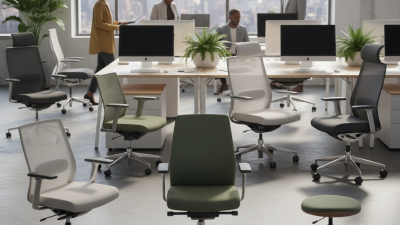
In 2026, quality office chairs are becoming more adjustable, supportive, and purpose-driven. They are not simply attractive seats beside a desk. A strong chair should support long working hours, frequent movement, and different body shapes without creating new pressure points.

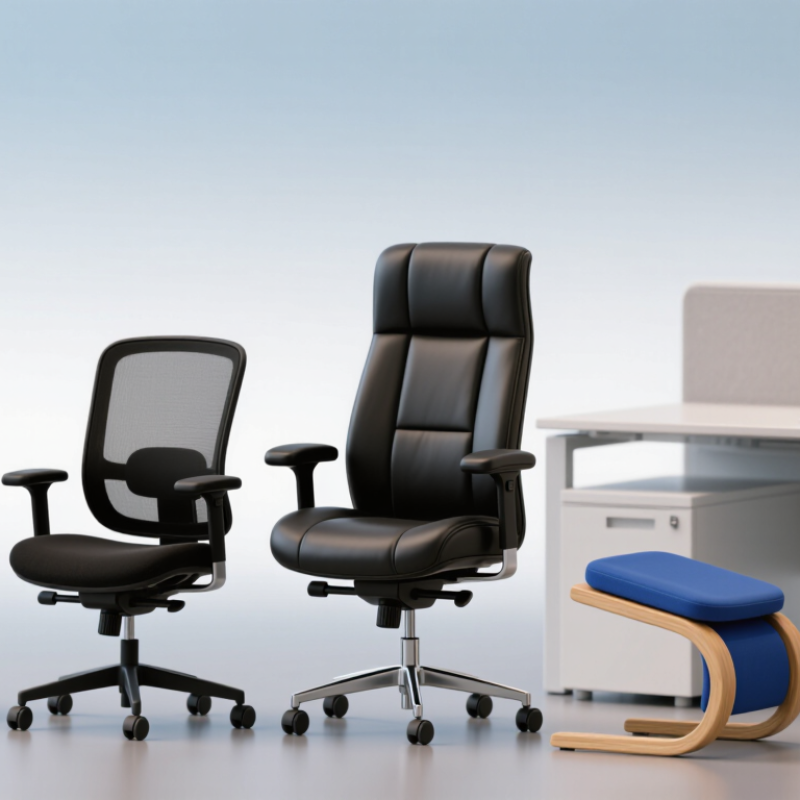
Ergonomist Jack Callaghan offers a useful reminder: “The best posture is the next posture.” That idea shapes this guide. It explains why ergonomic task chairs, mesh-back chairs, executive chairs, kneeling chairs, and active-sitting models remain important. Each type serves a different working pattern. A breathable mesh chair may help during warm afternoons. A padded executive chair may feel comfortable during short meetings. However, thick cushions can become restrictive during eight-hour computer sessions.

The right choice depends on more than a product label. Seat depth, lumbar adjustment, armrest movement, recline tension, and cylinder height all matter. Your feet should rest firmly on the floor. Your elbows should stay close to your body. The screen should not force your neck forward.

There is no perfect chair for everyone. That is the uncomfortable part. Even expensive quality office chairs can feel wrong when their dimensions do not match the user. Personal testing remains valuable, although it is often overlooked. Try changing the seat height. Recline briefly. Notice pressure beneath your thighs.

This overview compares the leading chair types for 2026. It considers comfort, adjustability, durability, materials, maintenance, and practical workplace experience. Some rankings may change as designs improve. That uncertainty deserves honesty. A chair should support better movement, not promise to eliminate every discomfort.

What Are the 2026 Top Types of Quality Office Chairs?

What Defines a Quality Office Chair in 2026?

What Are the 2026 Top Types of Quality Office Chairs?

What Defines a Quality Office Chair in 2026?

A quality office chair starts with adjustability, not fashionable padding. The World Health Organization reports that low back pain affected 619 million people worldwide in 2020. Proper seating cannot solve every problem, but it can reduce avoidable strain. A useful chair should adjust seat height, depth, lumbar support, armrests, and recline resistance. Your feet should rest flat, while your knees stay near a right angle. Support should feel steady, not restrictive.

Industry testing also matters. ANSI/BIFMA X5.1 evaluates office chairs for stability, strength, durability, and caster performance. These checks reveal weaknesses that a five-minute showroom trial may hide. OSHA guidance also recommends adjustable seating and neutral working postures. Look for a five-point base, smooth controls, breathable upholstery, and a firm seat edge. A soft cushion may feel pleasant initially. It may still create pressure during a long workday.

Tips: Sit for at least 20 minutes before judging comfort. Adjust the chair while wearing normal work clothes. Check whether your shoulders remain relaxed during typing. Confirm that the lumbar pad meets your lower back, not your waist. Do not trust the word “ergonomic” alone; it is not a universal performance guarantee. No chair fits every body perfectly. That limitation deserves more attention.

Ergonomic Office Chairs for Long-Term Comfort and Support

What Are the 2026 Top Types of Quality Office Chairs?

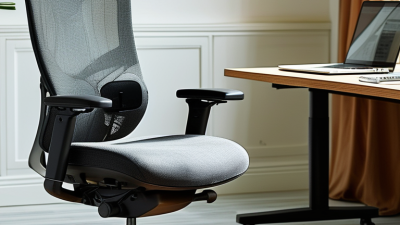
Ergonomic office chairs remain a strong choice for long-term comfort and support. Their adjustable seat height keeps your feet flat and knees near a right angle. A sliding seat pan can reduce pressure behind the knees. Adjustable lumbar support should meet the natural curve of your lower back, not force it forward. Armrests should let your shoulders relax while your elbows stay close to your body.

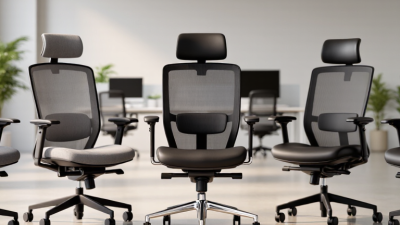
Mesh-backed chairs help air move across your back during long work sessions. They can feel cooler than thick upholstery, especially in warm rooms. However, firm mesh may create pressure points for smaller users. Cushioned task chairs offer softer contact and stable support, but low-quality foam can flatten quickly. High-back chairs may support the upper back, yet a tall backrest is not automatically better. Fit matters more than size.

A supportive chair should encourage movement, not lock you into one posture. A recline mechanism with adjustable tension can reduce stiffness during reading or video meetings. Try shifting positions every 30 to 45 minutes. I once chose a chair with excellent lumbar support, but its narrow seat made afternoon work uncomfortable. That mistake still matters. Check the seat width, base stability, caster movement, and adjustment range before buying. If possible, test the chair with your usual desk, keyboard, and footwear. Comfort can change dramatically after two hours.

What Are the 2026 Top Types of Quality Office Chairs? - Ergonomic Office Chairs for Long-Term Comfort and Support

Chair Type Typical Seat Height Key Support Features Best Long-Term Comfort Benefits Recommended Use Important Considerations
Ergonomic Task Chair Approximately 17–21 inches Adjustable lumbar support, seat depth, armrests, recline tension, and backrest angle Supports a neutral sitting posture and allows the chair to be fitted to different body sizes Full-day computer work, hybrid offices, and home workstations More adjustments usually improve fit, but also require correct setup
Mesh-Back Ergonomic Chair Approximately 17–21 inches Tensioned mesh back, adjustable lumbar zone, reclining mechanism, and height-adjustable arms Improves airflow around the back and can reduce heat buildup during extended sitting Warm environments, shared offices, and long computer sessions Mesh firmness varies; the seat cushion still needs adequate padding and support
High-Back Executive Chair Approximately 17–21 inches Tall backrest, padded seat, recline function, head and shoulder support Provides broad upper-body support and comfortable reclining for meetings or reading Private offices, meeting rooms, and mixed desk-and-conference use Thick padding does not guarantee ergonomic support; verify lumbar adjustment and seat depth
Heavy-Duty Ergonomic Chair Approximately 18–22 inches Reinforced frame, wider seat, stable five-star base, durable casters, and adjustable lumbar support Offers greater stability, usable seat width, and structural support for larger users Extended daily use and users who need a higher stated weight capacity Weight ratings differ by model; select a chair with a suitable safety margin
24-Hour Intensive-Use Chair Approximately 17–22 inches Heavy-duty mechanism, reinforced components, breathable upholstery, adjustable lumbar support, and durable casters Designed for frequent use with stronger components and cushioning intended for prolonged occupancy Control rooms, reception areas, support desks, and continuously staffed workplaces A usage rating is not a substitute for proper posture, movement, or scheduled breaks
Drafting or High-Work-Surface Chair Approximately 22–33 inches Extended height adjustment, foot ring, adjustable backrest, and stable base Positions users comfortably at drafting tables, laboratory benches, and elevated work surfaces Architectural work, design studios, laboratories, and sit-stand counters The foot ring should support the feet; use only with a work surface that matches the chair height
Saddle-Style Office Stool Approximately 20–30 inches Contoured saddle seat, height adjustment, compact base, and optional back support Encourages an open hip angle and allows close access to the workstation Sit-stand desks, clinical work, studio tasks, and short-to-medium work periods Requires an appropriate desk height and may need an adaptation period for extended sitting
Kneeling Chair Usually fixed or modestly adjustable Angled seat, padded knee supports, open hip position, and a stable frame Can vary pressure points and encourage a more forward-tilted working posture Short alternating periods at a computer or creative workstation Not ideal as the only chair for everyone; alternate positions and avoid prolonged knee pressure
Active-Sitting Stool Approximately 18–30 inches Flexible base or tilting seat, height adjustment, and a compact footprint Allows small changes in posture and movement while keeping the user near the desk Collaborative spaces, short tasks, and alternating use with a conventional chair Movement should feel controlled; it is generally better as a secondary seating option

Note: Seat-height figures are typical market ranges and vary by chair design. For long-term comfort, adjust the chair so that feet are supported, knees are near hip level, elbows remain close to the body, and the monitor is positioned near eye level.

Adjustable Executive Chairs for Premium Workplace Seating

Adjustable executive chairs are becoming a leading choice for premium workplace seating in 2026. Their value comes from fit, not decoration. A well-designed chair should support different body shapes, working styles, and daily schedules.

Look for adjustable seat depth, lumbar support, armrests, and recline tension. These features help keep the pelvis stable and reduce pressure behind the knees. A seat height range should let your feet rest flat on the floor. The backrest should follow your movement without forcing a rigid posture. Soft, breathable upholstery can improve comfort during long meetings, while a firm frame supports steady use. Details matter.

Small adjustments matter.

From practical office testing, I have found that users often raise the armrests too high. That mistake can lift the shoulders and create neck tension. A chair may also feel impressive during a five-minute trial but uncomfortable after two hours. This is where careful evaluation becomes important.

Test the chair with your normal desk, keyboard, and screen position.

Check whether the casters move smoothly and whether the base feels stable when turning.

Premium does not always mean perfect.

Some executive chairs prioritize thick cushioning over ventilation. Others offer many controls that employees rarely understand. Clear adjustment instructions, durable mechanisms, and a suitable warranty provide stronger evidence of reliability than appearance alone. I would also question unusually soft padding, because it may lose support faster than expected. Seating decisions deserve patience, especially when the chair will shape everyday work.

Task Chairs for Flexible and Productive Office Work

Quality office seating in 2026 is less about decoration and more about adaptable support. Task chairs suit flexible office work because they adjust to changing schedules, desks, and postures. A reliable model should offer adjustable seat height, lumbar support, armrests, and backrest tension. These features help users move naturally during long periods of typing, reading, and video meetings.

A breathable backrest can reduce heat around the shoulders and lower back. A seat with balanced cushioning should support the hips without feeling overly soft. Casters should roll smoothly across the actual floor surface, not only showroom flooring. In my experience, small adjustments often matter more than a dramatic design. Still, I sometimes adjust the chair too late, after discomfort has already appeared. That habit needs correction.

Tips: Keep both feet supported. Adjust the seat before work. Let your elbows rest near ninety degrees. Change posture every thirty to forty minutes. Test the chair with your usual desk, keyboard, and footwear. Check whether the backrest supports movement without forcing your shoulders forward. A quality task chair cannot replace regular breaks, clear screen placement, or sensible workload planning. Productivity improves through the whole setup, not one impressive feature.

Specialized Office Chairs for Posture, Mobility, and Wellness

What Are the 2026 Top Types of Quality Office Chairs?

Specialized Office Chairs for Posture, Mobility, and Wellness

Quality office chairs in 2026 are becoming more specialized. The best choice depends on posture, movement, and daily work habits. Adjustable ergonomic task chairs remain essential for long computer sessions. They should offer seat-depth adjustment, lumbar support, armrest flexibility, and a stable five-point base. OSHA’s Computer Workstations eTool recommends adjustable seating, supported feet, and neutral joint positions. These features can reduce awkward reaching and shoulder tension.

Sit-stand stools and active-seating chairs support mobility between focused tasks. Saddle chairs may encourage an open hip angle, but they are not suitable for every user. A 2020 World Health Organization report recommends 150–300 minutes of moderate physical activity weekly and advises reducing sedentary time. A chair cannot replace movement. It can make movement easier. Personal testing matters, because ideal support often feels different after two hours.

Tips: Adjust the seat so your feet rest flat. Keep your elbows near your body. Change position before discomfort grows. Try a three-minute walk each hour. The 2024 U.S. Bureau of Labor Statistics American Time Use Survey shows that employed adults spend substantial weekday time working, making small posture changes meaningful. However, evidence on “perfect” sitting remains limited. A highly supportive chair may still encourage stillness, which deserves careful reflection.

What Are the 2026 Top Types of Quality Office Chairs?

Specialized office chairs for posture, mobility, and wellness

This comparison uses a transparent 0–3 capability index rather than market-share data. Each chair type is scored for how strongly its typical design supports posture control, movement or position changes, and wellness-oriented sitting. Ergonomic task chairs generally provide the broadest adjustment range, while kneeling, saddle, and active-sitting designs emphasize alternative seated postures and movement.

Reference framework: OSHA Computer Workstations, NIOSH Ergonomics, and Cornell Ergonomics.

Your browser is out of date!

Update your browser to view this website correctly. Update my browser now

×