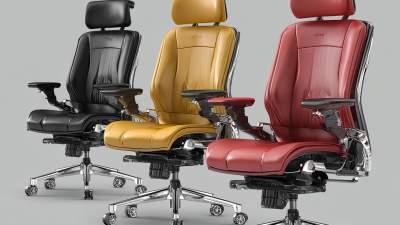
Choosing quality office chairs starts with how people actually work, not how a chair looks in a showroom. A chair may feel comfortable for five minutes and still become tiring by midafternoon. Niels Diffrient, an influential office-chair designer, is often associated with the principle, “The best posture is the next posture.” It captures an important idea: useful seating should support movement, not lock the body into one rigid position.
Look closely at the details. Can the seat height adjust so both feet rest steadily on the floor? Does the backrest support the lower back without pressing into it? Are the armrests adjustable enough to let shoulders relax while typing? Check the seat depth, too; a wide gap behind the knees can matter during a long workday. These features are not proof of quality by themselves, but they offer practical clues. Materials, build stability, repair options, and warranty terms deserve attention as well.
A polished showroom test is not enough. Try the chair at a desk, with your usual screen and keyboard, if possible. Notice pressure points after sitting for a while. Small discomfort can grow. Still, no chair fixes every workstation, and personal needs differ. That is easy to overlook. A careful choice weighs adjustability, durability, fit, and daily use together. This guide outlines those checks and the trade-offs worth considering before you buy.

A high-quality office chair supports your working habits, not just your first impression. Look for adjustments that let you change seat height, backrest angle, and armrest position. Your feet should rest flat, while a small gap remains between the seat edge and the backs of your knees.
Fit matters. A chair that feels comfortable in a showroom may feel different after several hours at a desk.
Pay attention to construction, too. A stable base should not wobble when you shift your weight, and the controls should move smoothly without sticking. Mesh can feel airy, while padded fabric may feel softer; neither is automatically better.
Check seams, joints, and the underside of the seat for loose parts or rough finishes.
Test it. Sit for at least ten minutes and try several adjustments.
A return period or clear warranty can offer useful reassurance, but it does not prove the chair will suit you. No chair fits everyone, and judging quality from appearance alone is an easy mistake.
A careful trial may reveal an awkward armrest or a seat that is simply too deep.
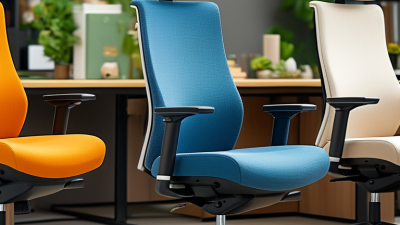
How to Choose Quality Office Chairs?
Assess Fit, Adjustability, and Ergonomic Support
A quality office chair should fit your body, not just look supportive. Start with seat height: your feet should rest flat on the floor, with knees near hip level. If they dangle, raise your feet with a stable footrest or choose a lower seat. The seat edge should leave a small gap behind your knees. Small check.
Adjustability matters because people shift throughout the day. Look for controls that let you change seat height, backrest angle, and armrest position. Adjust one setting at a time, then sit for several minutes. Your shoulders should stay relaxed, and your elbows should rest near your sides while typing. Controls that are hard to reach can make useful features easy to ignore. That gets annoying.
Good ergonomic support should follow your posture without forcing you into one rigid position. A lumbar support should meet the curve of your lower back, not press sharply into it. Try the chair at a desk height similar to your own, and notice whether you can recline comfortably while keeping your screen in view. A quick showroom sit is imperfect evidence; a longer trial may reveal pressure points. No chair fixes every setup, but a well-fitted one can make long work sessions more comfortable.
Assess fit, adjustability, and ergonomic support using practical workstation fit checks.
How to use this guidance: Adjust the chair so your elbows stay close to your body and your forearms are roughly level with the desk. Also check that your feet are supported, your thighs are comfortable, and the backrest supports your lower back. These fit checks depend on the person and workstation; prioritize a chair with adjustments that let you achieve them.
Angle guidance: U.S. OSHA Computer Workstations eTool recommends an elbow angle of 90–100°. Source: OSHA chair guidance
A quality office chair should withstand daily loading, not just look substantial in a showroom. The U.S. Bureau of Labor Statistics’ 2016 American Time Use Survey found that full-time workers spent an average of 6.5 hours of an 8.8-hour workday sitting. That makes fabric, foam, and frame choices practical concerns: tightly woven upholstery resists abrasion, while resilient foam should recover after pressure rather than stay visibly compressed. Check seams, welds, and the underside of the seat. A smooth finish can hide weak joints; I would not treat appearance as proof of durability.
Construction deserves measurable evidence. ANSI/BIFMA X5.1 evaluates general-purpose office chairs with strength and repeated-use durability tests, including tests for seats, backs, and bases. Ask whether a chair has been tested to this standard, and read the warranty for coverage of structural parts, upholstery, and adjustment mechanisms. A metal base is not automatically better; gauge, joint quality, and how the chair is assembled matter too. Certification helps, but it does not predict how every chair will feel after years of use.
Tips: Sit for several minutes and test the tilt, height lever, and casters on your actual floor. Look for even stitching and a stable base. If specifications omit foam density or test details, ask the seller—then compare the answers, not just the prices.
When comparing office chairs, ask for documentation showing which safety and performance standards the model meets. In North America, ANSI/BIFMA X5.1 is commonly used to assess general-purpose office chairs. Requirements differ by market, so check that the stated standard applies where you work. A certificate or test report is more useful than a vague “tested for safety” claim. Check the chair’s maximum load, stability, and adjustment mechanisms, too. A smooth recline should not jerk or catch. Small details matter.
Read the warranty before buying. Note its length, covered parts, and whether labor or shipping is included. Gas lifts, casters, upholstery, and armrests may have different coverage. Ask how to report a fault and whether proof of purchase is required. A long warranty sounds reassuring, but exclusions can narrow it considerably. I have learned that the fine print is easy to overlook when a chair feels comfortable in a showroom.
Maintenance needs to fit your actual routine. Look for clear instructions on cleaning fabric or leather, tightening fasteners, and inspecting moving parts. Dust around the casters and base can build up quickly, especially on carpet. Keep a small tool kit nearby. Not glamorous, but useful. If replacement parts are unavailable, a repairable chair may still become difficult to maintain. Check before committing.
Match chair features to your workspace and budget. Start with the tasks people actually perform. A shared desk needs quick height adjustment and simple controls. For long computer sessions, prioritize seat-depth adjustment, lumbar support, and breathable fabric. OSHA’s Computer Workstations eTool recommends adjustable chairs that support the lower back and let feet rest flat. Fit matters. A chair can meet a specification and still feel wrong after an hour.
Budget for useful adjustments, not decorative extras. The U.S. Bureau of Labor Statistics recorded 900,380 private-industry musculoskeletal cases involving days away, restriction, or transfer in 2018. This figure does not prove that a chair prevents injury, but it shows why workstation comfort deserves attention. ANSI/BIFMA X5.1 provides performance tests for general-purpose office chairs, including durability and stability. Check whether a chair’s documentation identifies applicable testing, and compare warranty terms with expected daily use. I would still test the seat in person; paper specifications miss small annoyances.
Tips: Measure desk height before shopping. Sit with your back against the backrest, feet supported, and elbows near desk level. In a compact room, check the chair’s footprint and armrest clearance. If funds are tight, favor adjustable lumbar support and a stable base over cosmetic upgrades. A slightly imperfect fit may be workable, but do not ignore pressure behind the knees.
Update your browser to view this website correctly. Update my browser now